
How Often Do You Use Teams?
For some of us, the answer is daily. We probably open it up, use it to chat with co-workers and customers, check our calendar, join meetings, host meetings, shut down and call it a day.
Did you know that there are features in teams that can enhance your productivity and enable you to get more value out of teams?
Let’s dive into these little known features, but before we do, just a reminder to read our disclaimer.
1. Search Bar Commands
Teams search bar commands is a powerful time saver. It’s easy to find and easy to use and works the same whether you use the browser-based version or the client.
My favorite command is the ability to quickly set my status. For example, if I want to set it to away, type /away and press enter
/away

That’s it! This a quick and easy time saver!
Another great command is /chat to quickly chat with someone without scrolling through a long history of chat’s looking for the person.

Simply type “/” to see a list of available commands.
2. Immersive Reader
The Immersive Reader can read aloud any text within Teams at various speeds. This is especially helpful if you receive a really long message or a word document that you may not feel like reading and would rather listen to the text. You could just be tired of looking at the screen and need to give your eyes a rest.
Immersive reader is also an accessibility tool and important for co-workers or partners who are visually impaired.
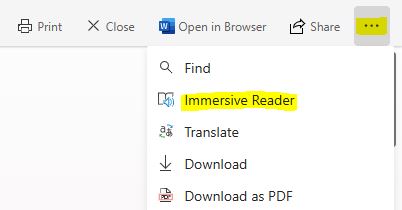
To use it, simply click the 3 dots in a chat message or word document opened in teams and select “Immersive Reader“.
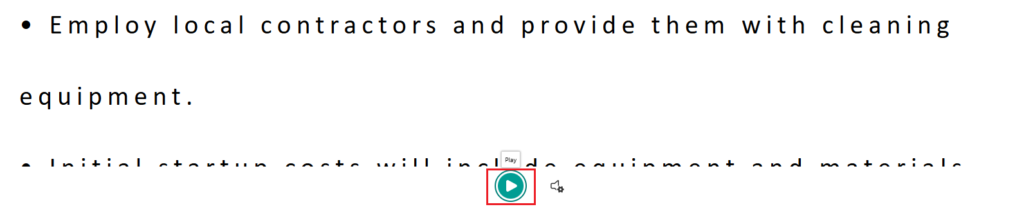
Another window will open up with the text of the document or chat along with a play button at the bottom.
Another nice underutilized feature standard in all versions of Teams.
3. Annotation
Are you looking to impress and spice up your next teams meeting and make it more collaborative? Well the annotation feature is a definite crowd pleaser. This feature is especially useful for remote teams because it encourages engagement and collaboration between the meeting participants.
You can use this feature while in a meeting and sharing your screen.

This feature uses Microsoft Whiteboard which includes a complete toolset of markers, highlighters and sticky notes.
Give this a try during next meeting and impress your colleagues and friends. If there is time after the meeting, you can use this to play Hangman or Pictionary. 😊
Conclusion
Well there you have it, 3 “hidden” features in teams that can improve your productivity. If you like this article, please share it and subscribe to our newsletter!
